
Unstructured data remains one of the great challenges of modern analytics.
Qlik Answers, part of the Qlik Cloud platform, promises to bridge the gap between structured dashboards and the messy world of documents, PDFs, and internal knowledge.
This article explores how Qlik Answers performs when tested with a deliberately confusing use case – a multi-manufacturer printer assistant – and what its behaviour reveals about the future of AI-driven knowledge systems.
Unstructured Intelligence in Practice
Unstructured data has been the elephant in the analytics room for decades. Everyone knows it’s where the real knowledge hides, yet few tools have managed to make sense of it without long and complex setup. Qlik’s attempt to change that, Qlik Answers, promises to take those buried PDFs, manuals and policies and make them searchable through a conversational interface.
I’ve been around Qlik long enough to see the platform evolve from a purely visual analytics tool into something that now plays confidently in the generative AI space. Earlier this year, I joined Mary Kern, VP of Analytics Portfolio Marketing on Qlik Insider to discuss that shift and what it means for organizations trying to bring structure to their chaos.
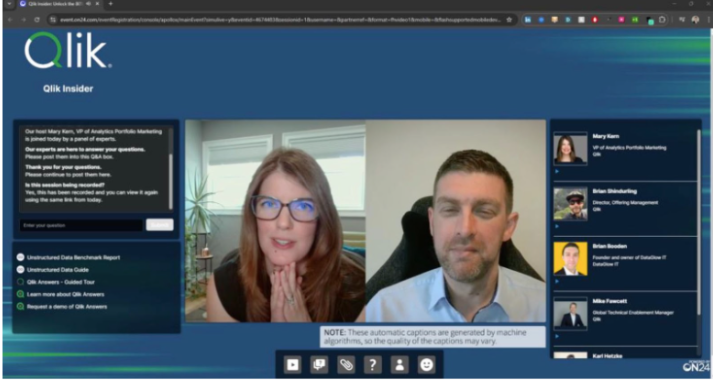
Figure 1: Talking with Mary Kern about Qlik Answers on Qlik Insider
“I think what’s really unique about Qlik Answers is that it applies to small businesses as well as large organizations,” I said during that session. “Everyone has unstructured data, whether it’s letters, cluster networks or service manuals. What’s powerful is how quickly you can connect and start getting useful answers without needing months of build.”
That appearance left me with an itch to scratch. I wanted to know how well Qlik Answers actually handles messy, real-world ambiguity – not the polished demo version, but the sort of inconsistent documentation that people really have to deal with. So I built something intentionally awkward to find out.
Setting the Stage – Building Knowledge Before Asking Questions
Before I could start asking questions, I needed to give Qlik Answers something to know. That’s the beauty of it – you don’t train a model in the traditional sense, you curate Knowledge.
Inside Qlik Cloud, everything starts with a Knowledge Base – a collection of documents or web sources indexed for retrieval. You can upload PDFs or Word files directly, or connect to systems like SharePoint, Dropbox or S3 so that your knowledge stays synchronized with its original source.
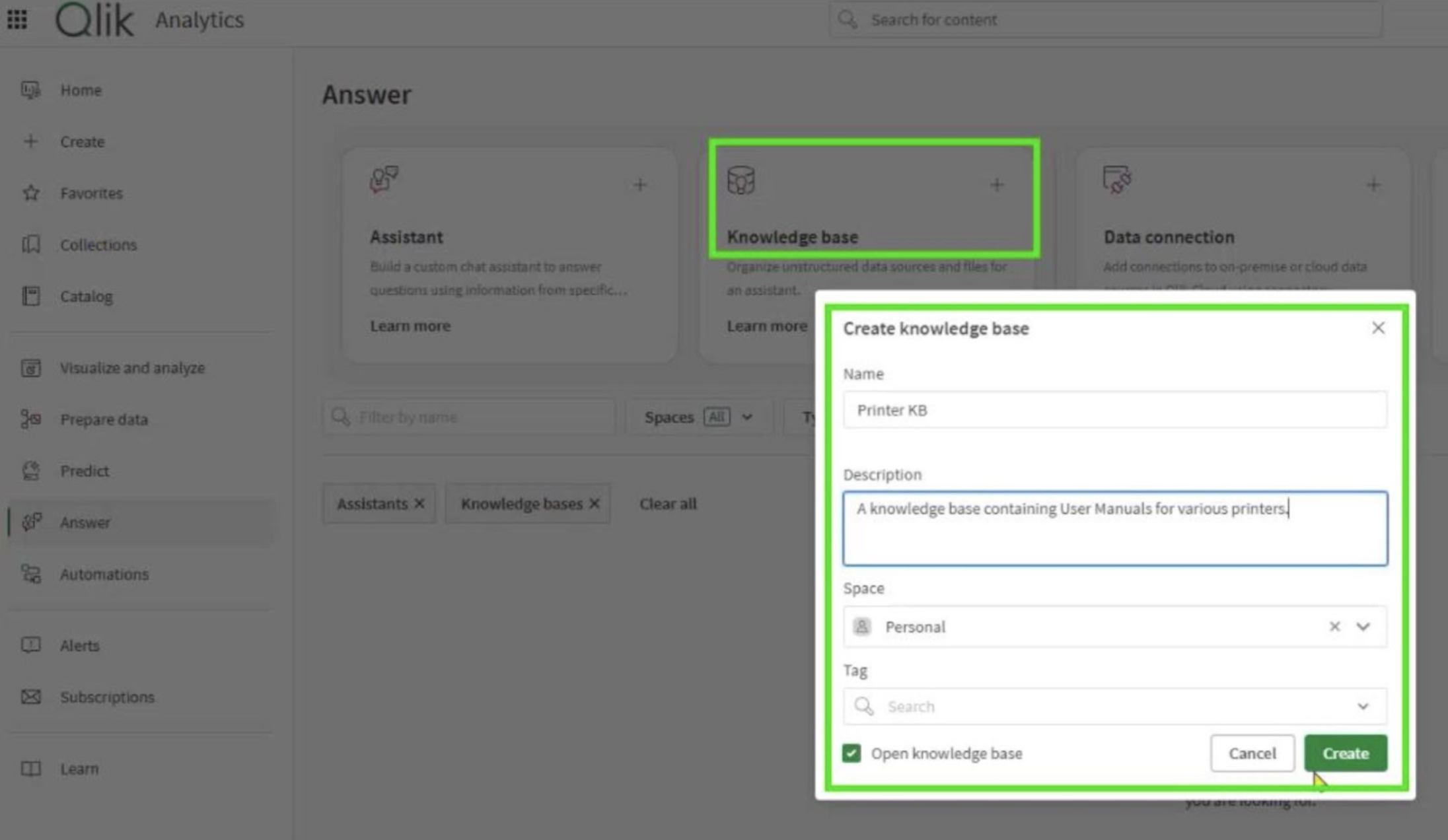
Figure 2: Setting up the Printer KB Knowledge Base in Qlik Answers
Once a Knowledge Base exists, you link it to an Assistant. The Assistant is the user-facing side – the conversational interface where you actually ask your questions. You can have one Assistant talking to a single Knowledge Base, or several pulling from complementary sources. Each Assistant inherits Qlik’s existing security model, so it respects the same access controls already defined elsewhere in Qlik Cloud.
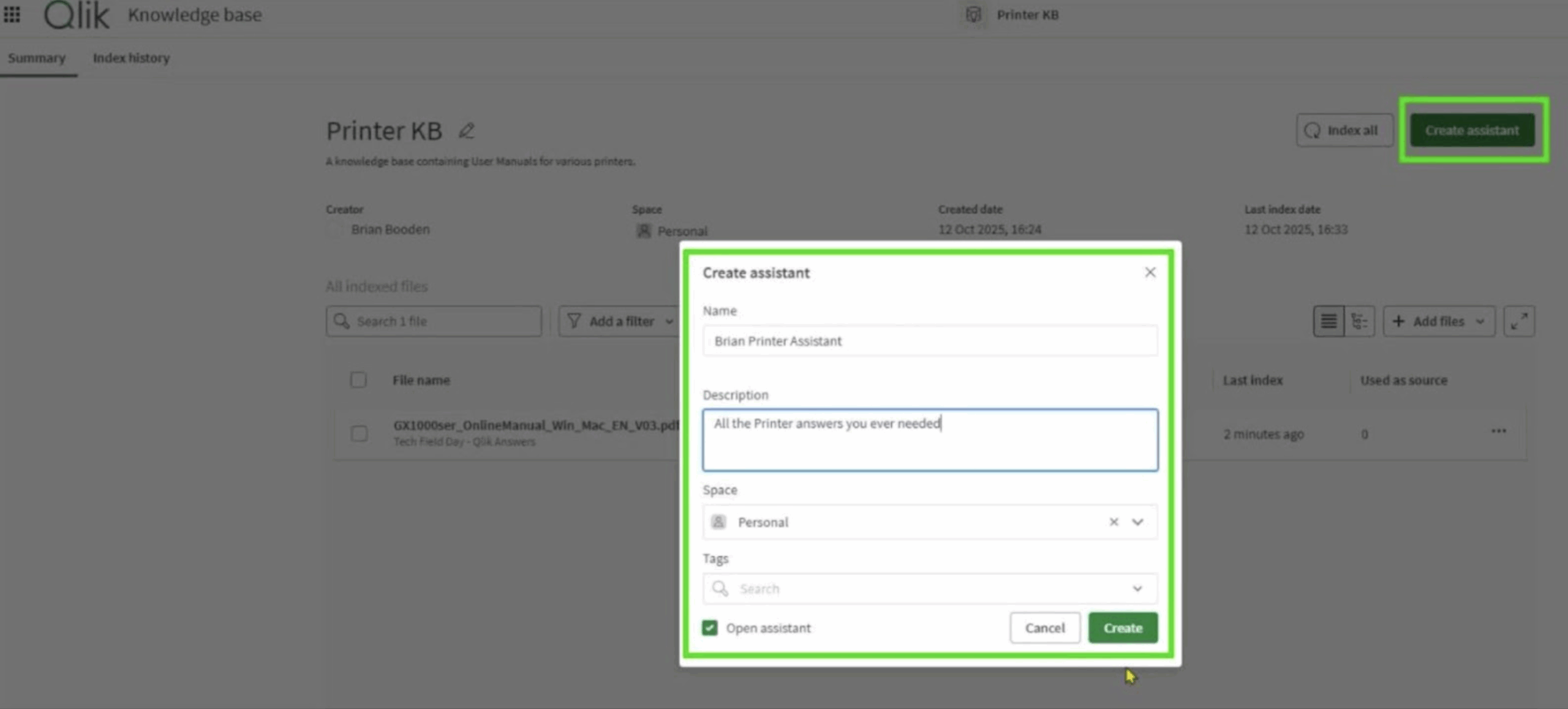
Figure 3: Creating the Printer Assistant in Qlik Answers
Creating both is straightforward. You name the Knowledge Base, select where it lives – Personal, Shared, or Managed space – and then upload or connect your files. Qlik automatically chunks, embeds and indexes them in the background.
You then create your Assistant, choose which Knowledge Bases it can access, and add optional Conversation Starters to help users get going. Within minutes, you have a working AI assistant that can reference its sources and cite the exact page it drew from.
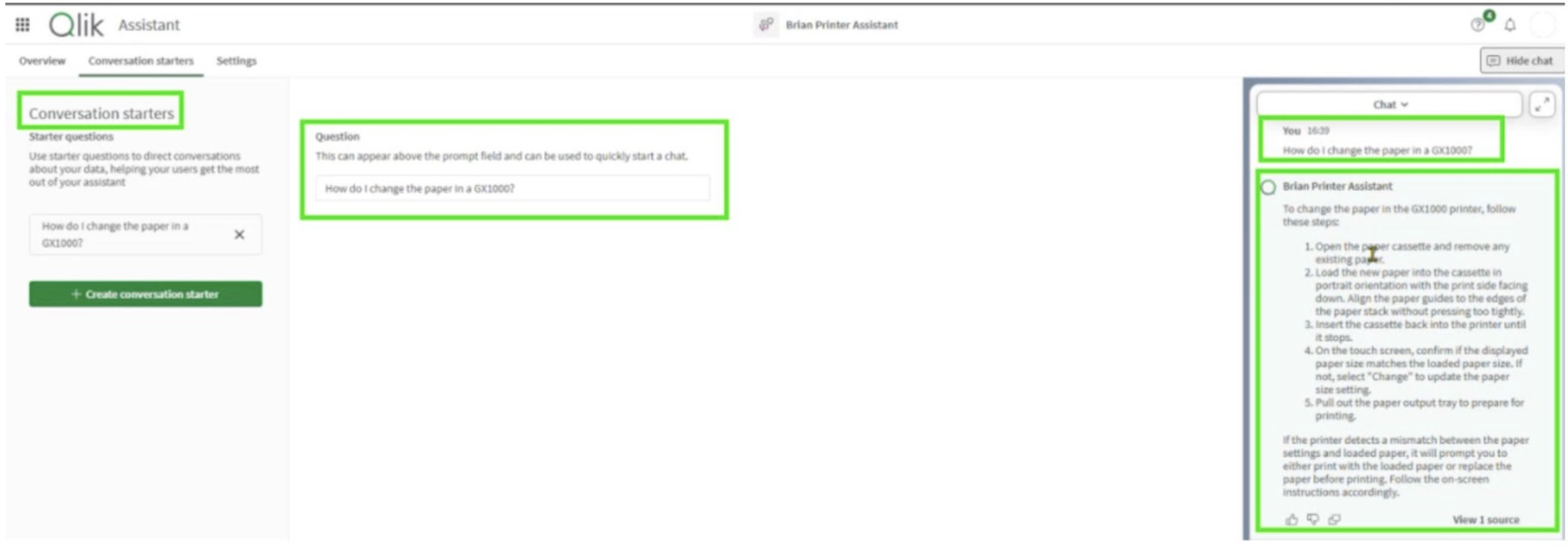
Figure 4: Setting Up and Utilizing Conversation Starters
That setup process alone is a quiet triumph. It’s the first time I’ve seen a truly enterprise-grade approach to Retrieval-Augmented Generation (RAG) where the barrier to entry is low enough for business users, yet still governed by Qlik’s space model.
With that foundation in place, I could get to the real test.
Building a Sandbox for Confusion
My experiment was called Printer Assistant. It sounds dull because it was meant to be. I loaded three full printer manuals of several hundred pages – one each from Epson, Canon and Dell – into Qlik Answers and asked it to act as a support chatbot.
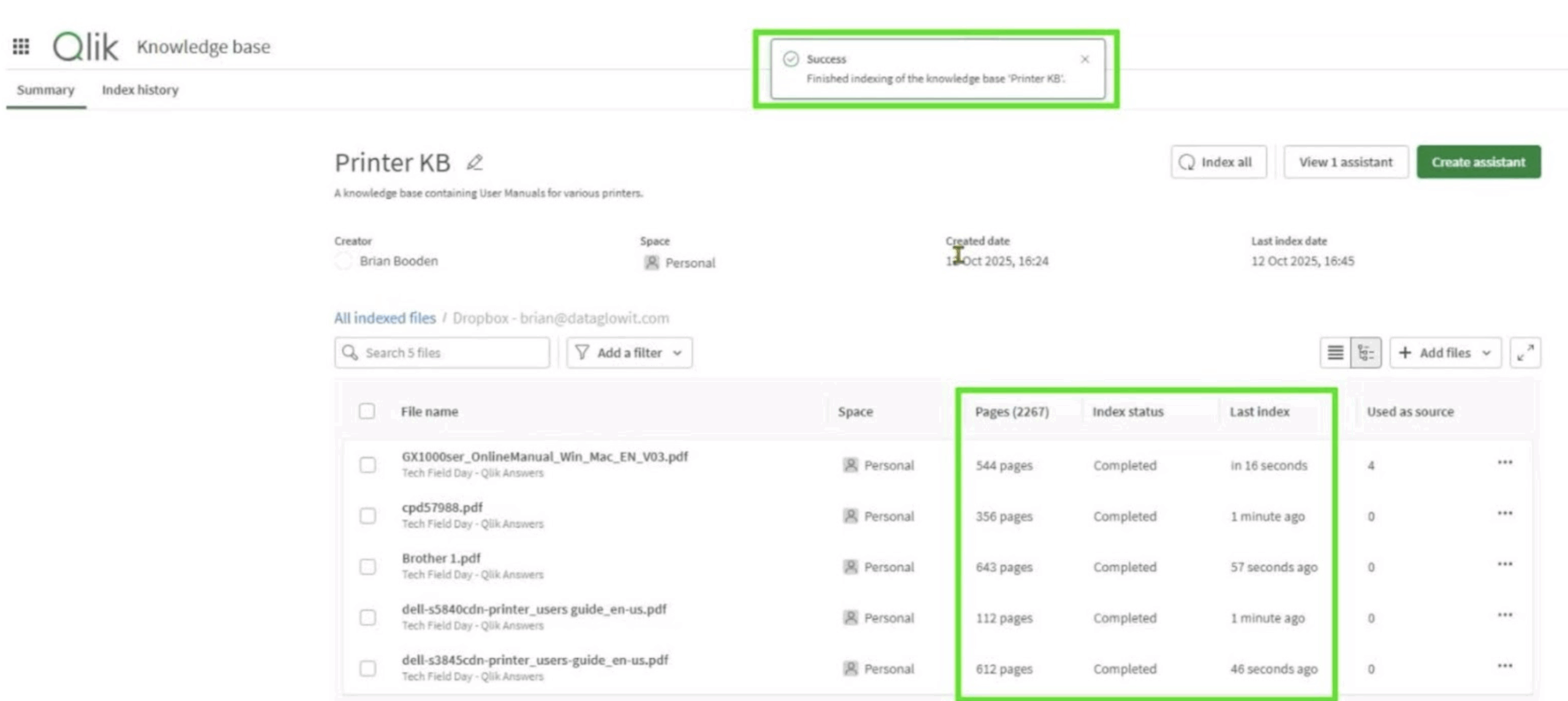
Figure 5: Indexing pages in the Knowledge Base
The idea was to see how accurately it could distinguish between brands and models when given similar-sounding instructions. I started with basic queries such as How do I change the paper tray on an Epson printer? and How do I replace the ink cartridge for a Dell S3845?
At first glance, it was a triumph. Answers came back quickly, complete with step-by-step guidance and PDF references. The problem was that the steps for the Epson came from the Brother manual, and the Dell sometimes borrowed from Canon.
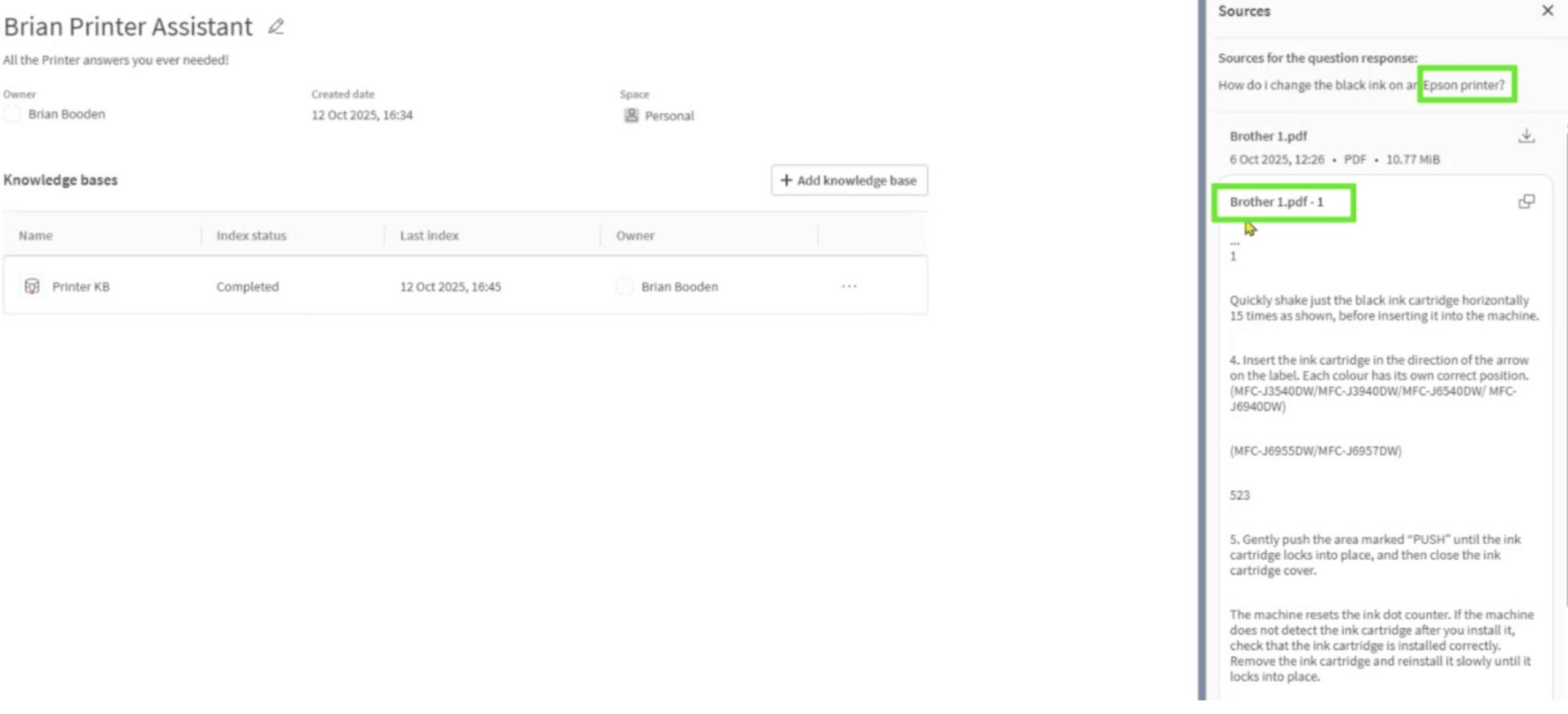
Figure 6: Epson and Brother – confusion or by design?
That was the moment I realised Qlik Answers wasn’t hallucinating – it was retrieving confidently from the wrong source. It wasn’t making things up; it was simply too generous in what it considered “similar”.
When Good Retrieval Goes Astray
By design, Qlik Answers uses retrieval-augmented generation. It breaks your documents into smaller segments, represents them as vectors in a high-dimensional space, and retrieves those most semantically similar to your query. The top results are then passed to a large language model which crafts the final response.
It’s an elegant system, but not immune to context bleed.
Printer manuals are notorious for linguistic similarity – the instructions for loading paper or clearing a jam read almost identically across brands.
When those chunks live in the same Knowledge Base, they occupy nearly the same semantic coordinates. In short, the system sees them as interchangeable.
That’s not a criticism of Qlik Answers specifically; it’s a known trait of all RAG-based systems. What mattered was whether the design allowed me to mitigate it.
Separating the Noise
The solution turned out to be surprisingly simple. I split my single “Printers” Knowledge Base into three – one for each manufacturer. Each Assistant then pointed to its respective Source.
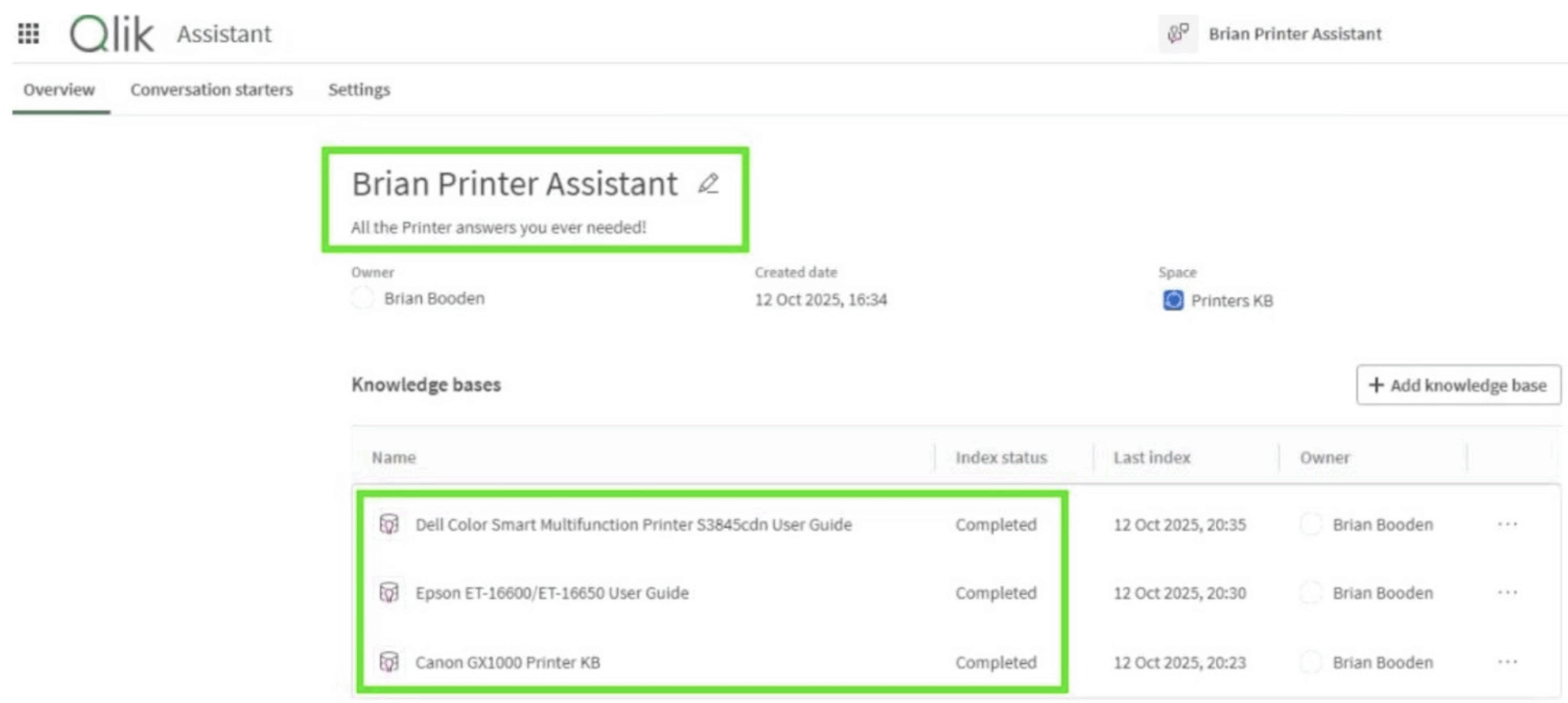
Figure 7: A separate Knowledge Base for each Printer Manufacturer
Immediately, the confusion stopped. When I asked How do I change the ink cartridge for a Canon printer? it drew only from the Canon manual, cited the correct page, and gave a clean, confident answer.
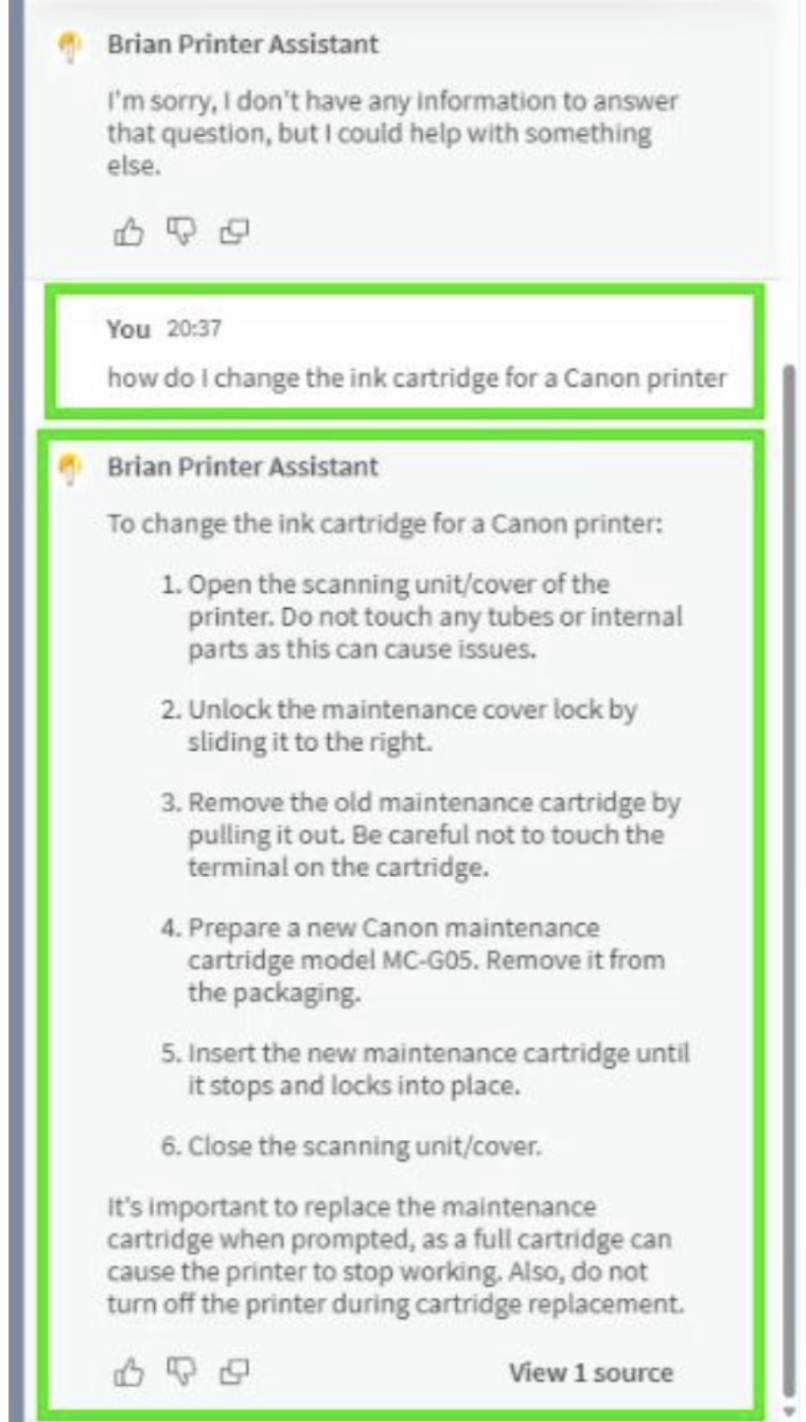
Figure 8: Canon printer questions utilizing a specific Canon KB
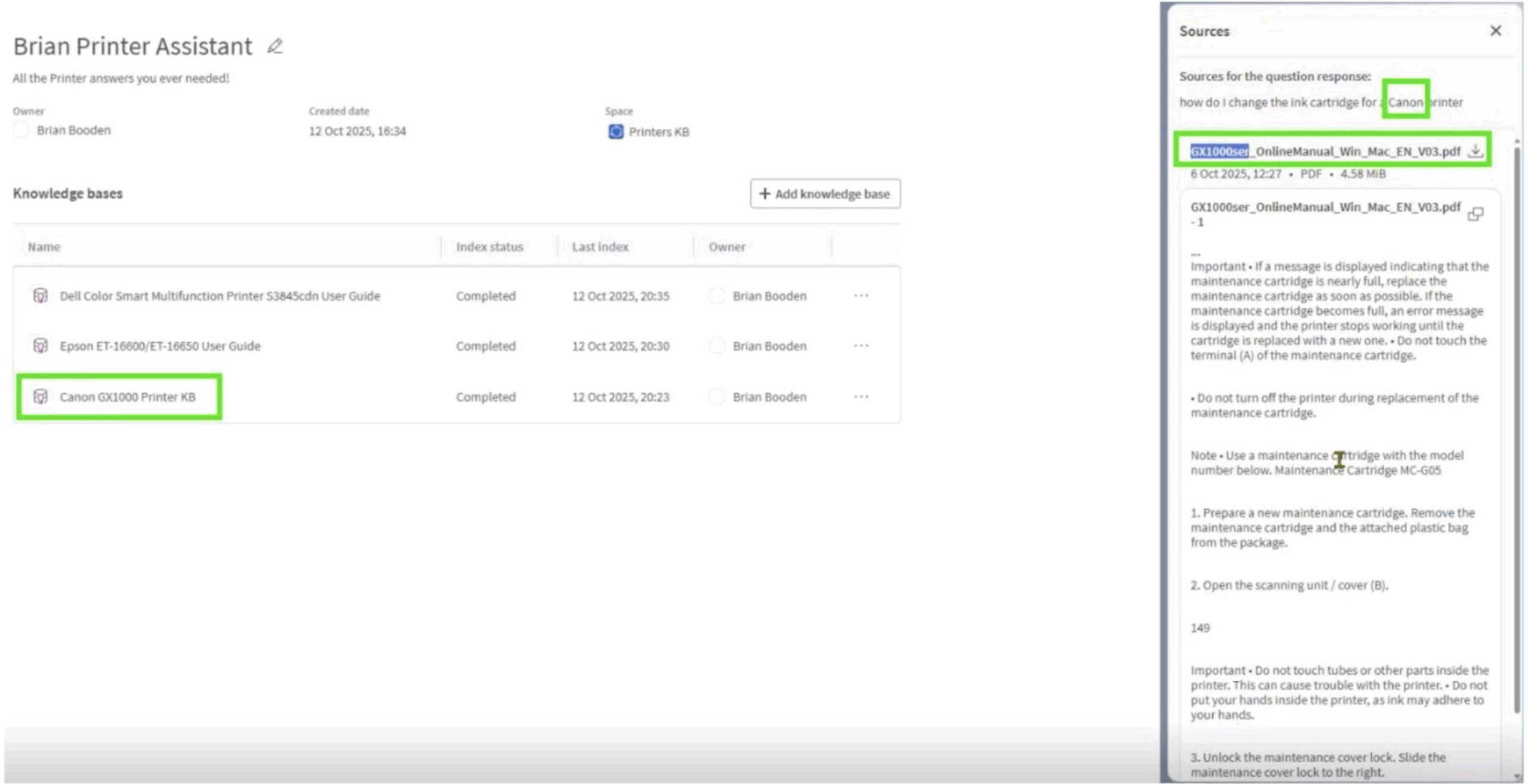
Figure 9: Using View Sources to verify Canon KB source
That small change highlighted a big principle: Qlik Answers rewards thoughtful architecture. It assumes that documents grouped together belong together. When you reflect that in your Knowledge Base design, the quality of its retrieval improves dramatically.
Testing the Boundaries
With brand separation sorted, I moved to edge cases. When I asked Do you know about HP printers? – a model it hadn’t seen – it responded that no such content was available. That restraint matters. It’s easy to underestimate how valuable it is when an AI says “I don’t know”.
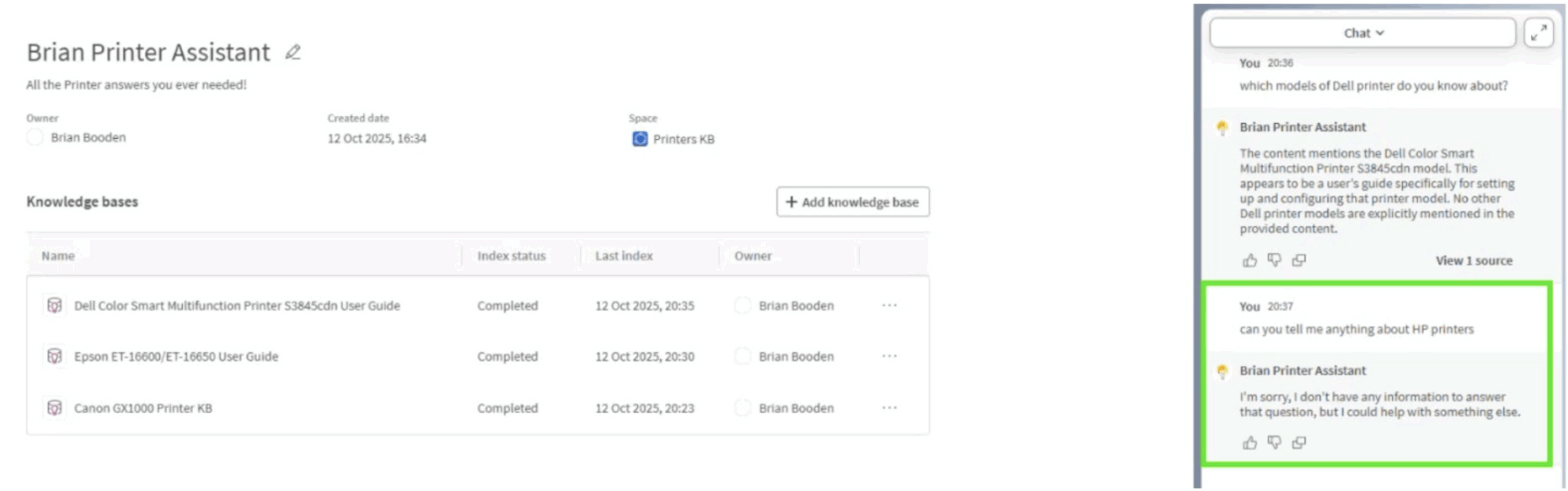
Figure 10: No hallucinations when the data is not present
Then came the trickier checks. I asked about fictional models, in this case the Dell D4721 and intentionally ambiguous phrasing. Qlik Answers didn’t bluff. It replied with contextually correct, general answers but made no attempt to fabricate detail. That’s responsible behavior – and refreshing.
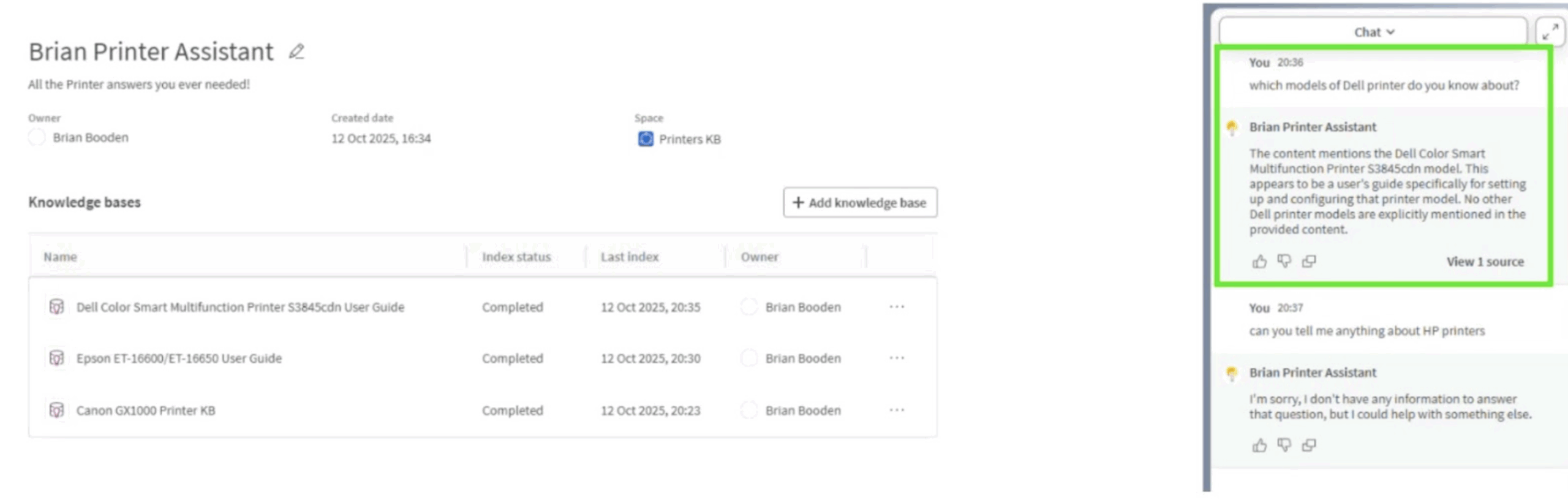
Figure 11: Accurately describing the Dell printer model available
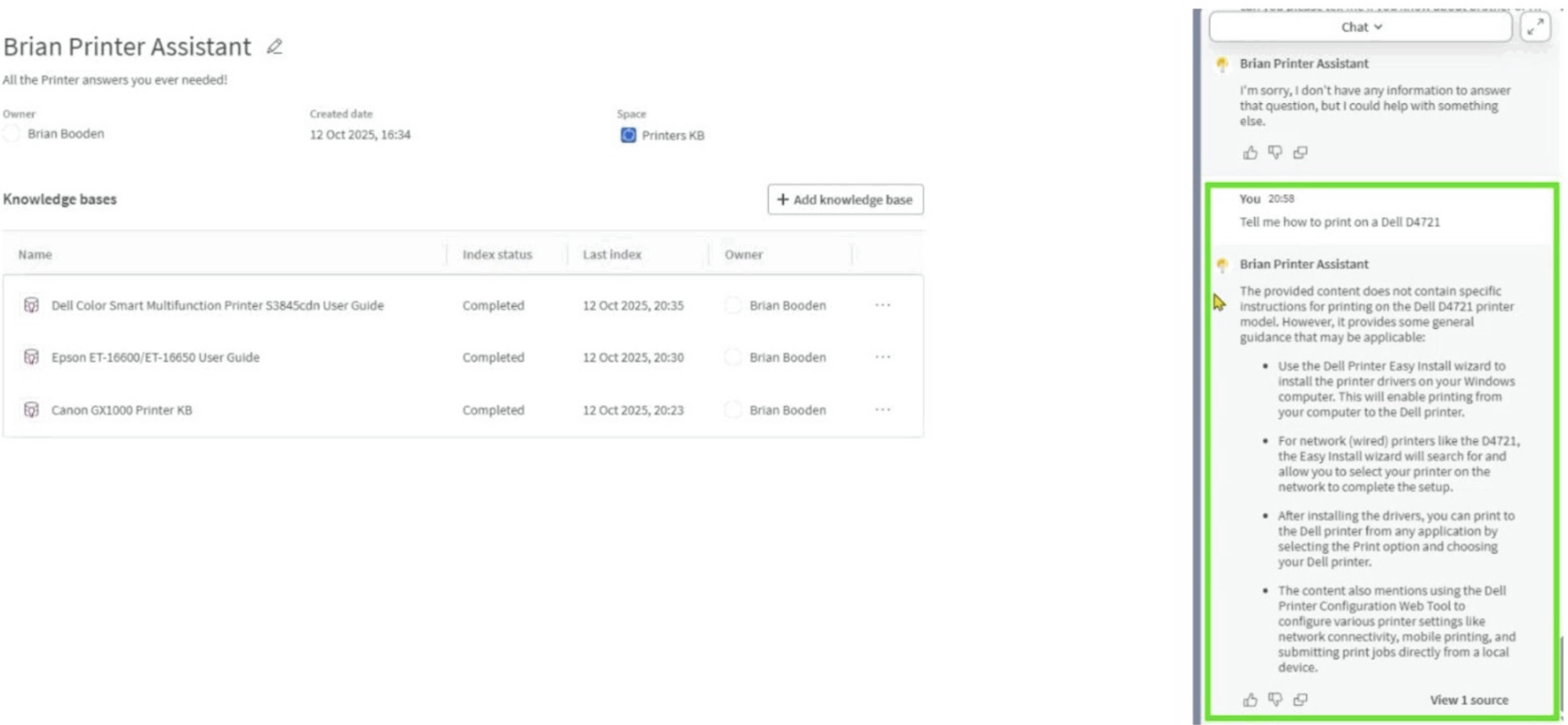
Figure 12: Acknowledging lack of knowledge, but applying general context
Where It Still Struggles
There are limits, of course. Manuals use diagrams and icons that don’t survive indexing, so any reference like “press the [Home] button” becomes just “press the button”. You can still follow the logic, but the finer user-interface cues vanish.
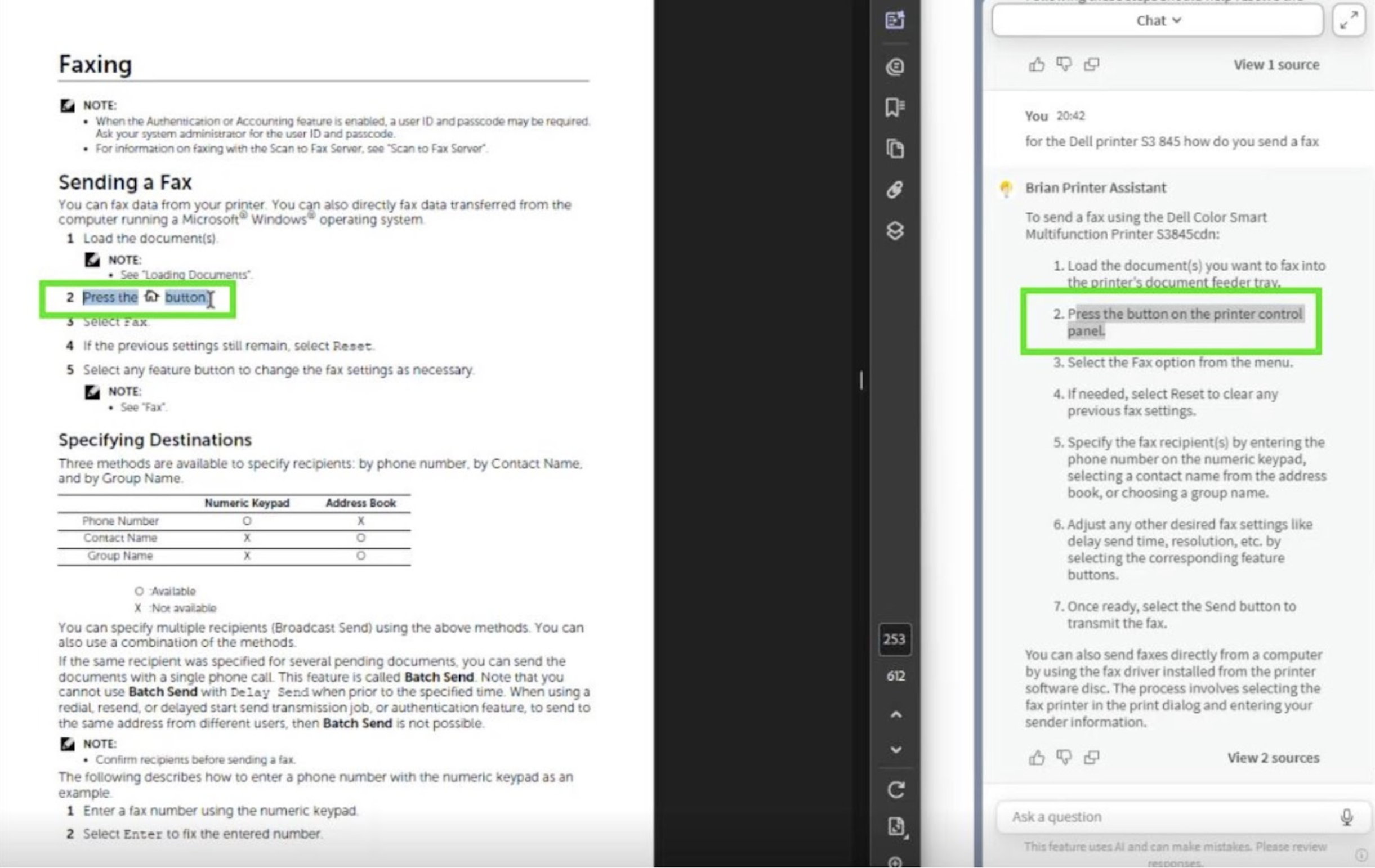
Figure 13: Losing context of an icon or image
Compound questions – How do I change the ink in both an Epson and a Dell printer? – also show the system’s single-threaded nature. It chooses one intent and runs with it, rather than splitting the query. That’s deliberate design for simplicity, but in complex use cases it can feel restrictive.
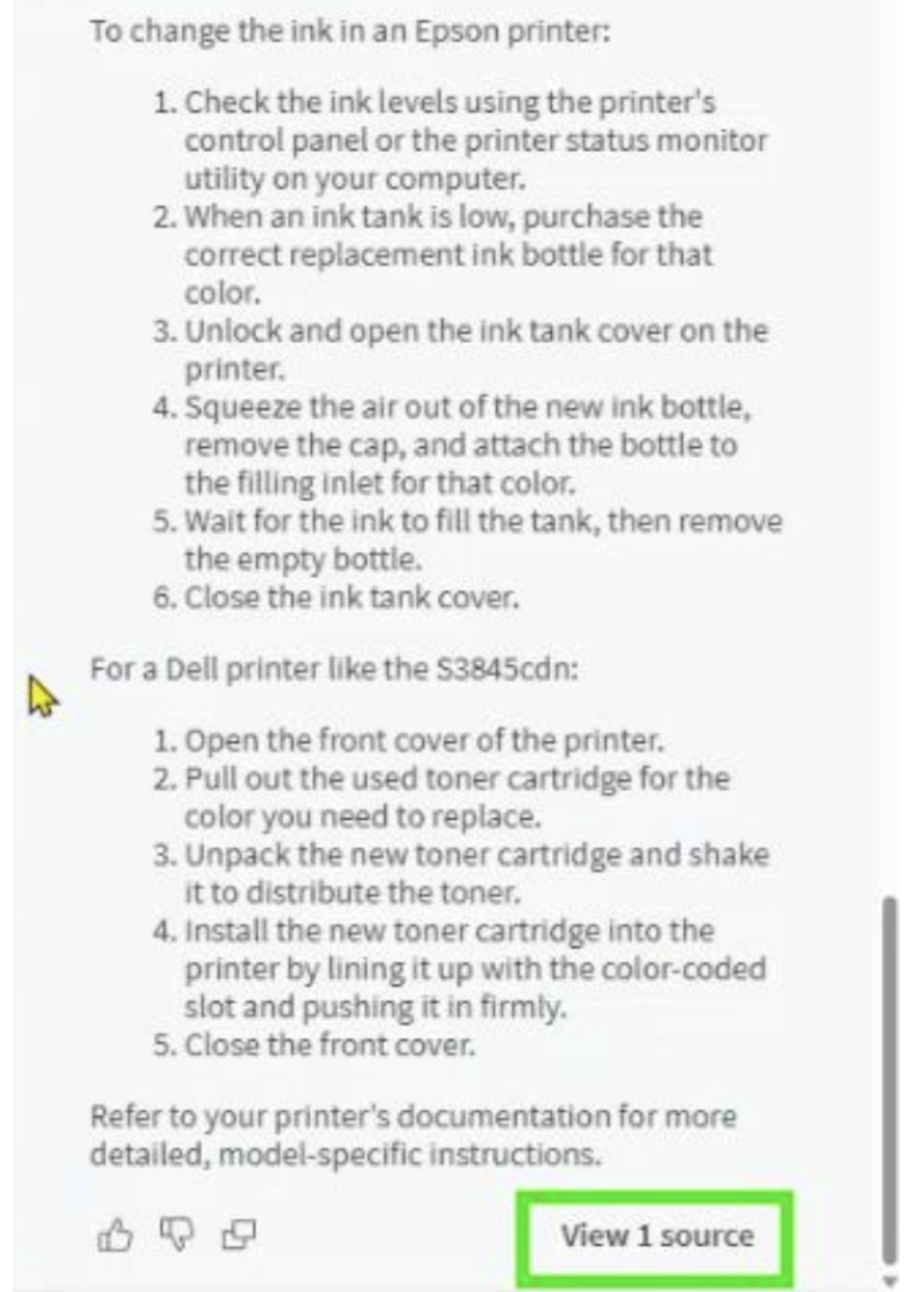
Figure 14: Double edged questions need careful handling
Finally, there’s a subtle ranking bias: longer or more text-heavy documents tend to dominate retrieval. It doesn’t distort accuracy too much, but it does remind you that structure and metadata still matter.
Lessons for the Enterprise
These quirks aren’t bugs – they’re side effects of Qlik Answers’ underlying honesty. It retrieves what it’s been told to retrieve, from the content it’s been given. That means your architecture defines its behaviour.
For organizations, that’s both empowering and cautionary. A well-curated Knowledge Base with consistent file structures and meaningful metadata performs brilliantly. A chaotic one reflects its chaos back at you.
The Printer Assistant may be a toy example, but the implications scale directly to real-world scenarios:
- Call-center knowledge management
- Field engineering guide
- Compliance handbooks
Anywhere that static documents hide expertise, Qlik Answers can surface it safely and Conversationally.
From Curiosity to Capability
One of the things I appreciate most about Qlik’s approach is its accessibility.
You don’t need to be a machine learning engineer to build a working assistant. The interface is declarative and secure – create, connect, index, and go. For Qlik developers, it’s the same pattern of governed simplicity that’s defined the platform for years.
Qlik Answers doesn’t try to replace search engines or analysts. It simply extends the reach of analytics into unstructured territory. It’s the associative engine’s distant cousin – less numerical, more linguistic – but driven by the same idea: that knowledge should be connected, not locked away.
Final Thoughts
After hours of experimenting, refining and deliberately confusing my own chatbot, I’ve come away with a deep respect for Qlik Answers.
It’s not a perfect system, but it’s an honest one.
When it’s wrong, it’s predictably wrong – and that’s an underrated quality in AI. When it’s right, it feels effortless.
Qlik Answers isn’t trying to dazzle anyone; it’s trying to be useful. It gives you back exactly what you’ve taught it – nothing more, nothing less. If your information is clear, it behaves clearly. If it isn’t, it will show you where the gaps are.
That’s the balance I like. It behaves in a way that reflects the real world rather than pretending to transcend it.
And in the increasingly noisy space of AI tools, that quiet reliability counts.
A lot.
