
TL;DR — Key Takeaways
- Reliable agentic systems require five distinct layers working as a stack.
- Project instructions enforce permanent safety rules and non-negotiable constraints.
- Prompts give users a simple, predictable way to start a task.
- MCP connects the agent to live systems and real operational data.
- Skills enforce repeatable workflows, checkpoints and documentation requirements.
- Sub-agents perform complex or parallel work without cluttering the main conversation.
- Removing any layer creates gaps in safety, usability, accuracy, discipline or scalability.
You have built an agentic system. It works at times. Sometimes it forgets steps. Sometimes it hallucinates conclusions. Sometimes it gets lost in 47 subprocess threads, and your user is drowning in noise.
You knew something was off, but you couldn’t name it.
It is because you were trying to solve five different problems with one tool.
The Five Building Blocks: a Stack, Not Options

Each layer solves a different problem. Each solution depends on the layers below.
Project: the Incident Investigation Assistant
Picture this: It’s 2 a.m. Production is down. Your DRI opens a chat window and types an app name. What should happen next?
Not chaos, not 47 tabs opening, not jumping to conclusions based on stale data.
Instead, a calm, structured walkthrough. One step at a time. Real data. Mandatory checkpoints. Parallel exploration that stays invisible. A root cause that actually holds up.
This is what great incident investigation systems do, and to build one, you need all five building blocks.
Let’s walk through it.
Layer 1: Project Instructions — the Rules That Never Bend
Before you write anything else, establish what is sacred.
For an incident system:
.github/copilot-instructions.md- NEVER conclude root cause without the full checklist- NEVER push directly to main- NEVER skip a diagnostic step, ever- NEVER create a ticket without human sign-off
These are not suggestions. They are non-negotiable rules that apply to every single interaction.
That is why they live in instructions, not in a skill. They are the foundation.
your-project/ .github/ copilot-instructions.md # The rules. Always active. README.md …
No exceptions. No working around them. The system enforces them from day one.
Layer 2: Prompts — the Clean Front Door
Your DRI should never have to think about what to ask. Prompts are the answer.
A prompt is one focused thing. One clean request. One predictable result.
/investigate-incident <app name>
The user provides the app name. You promise back: Structured findings, live data, root cause hypothesis.
Done. Clear. No ambiguity.
—mode: agentdescription: Investigate a production incident, step by stepagent: Investigation Commander—# Investigate an incident## You provide- Incident ID, app name or time range## You get back- Live telemetry snapshot- Structured investigation walkthrough- Root cause hypothesis with evidence- Recommended actions
Prompts stay lean. They do not contain the workflow. That is the skill’s job. Prompts just say “Here is the door. Walk through it.”
Layer 3: MCP — Your Connection to the Real World
Your agent can reason all day. However, without real data, it is just guessing.
MCP fixes that. It connects to the systems that know the truth.
Set up MCP servers:
# mcp-servers/telemetry.yamlid: telemetryname: Telemetry Databasetype: stdiocommand: uvx telemetry-query-mcp# mcp-servers/incidents.yamlid: incidentsname: Incident Management Systemtype: httpurl: https://incidents-api.example.com/v1authType: oauth
Now your agent has superpowers:
- run_query(sql) — Ask the telemetry system directly.
- get_incident(id) — Fetch live incident data.
- list_incidents(filters) — Search incidents in real-time.
MCP does one thing: It gives you access. It doesn’t tell you what to do with that access. That is the skill’s job.
Layer 4: Skills — the Good Stuff
Skills are where you encode everything you have learned the hard way.
An investigation skill is not just instructions. It is a structured process that cannot be skipped.
skills/investigate-incident/ SKILL.md # The workflow engine references/ investigation-checklist.md # What must be done root-cause-template.md # How findings are documented
Here is the enforcement:
You will follow six mandatory steps — not five, not seven but six.
- Gather app metadata from the telemetry system (show me the results).
- Query error logs (show me what broke).
- Check dependencies (show me what depends on this).
- Review recent deploys (show me what changed).
- Check system configuration (show me what is different).
- Only after steps 1–5, propose the root cause.
Save every finding to investigation-findings.md as you go. No step gets skipped. No shortcuts. No exceptions.
A prompt can describe steps. A skill enforces them. That is the difference.
Layer 5: Sub-Agents — Keep the Main Thread Clean
Here is where it gets fun: Parallel work that doesn’t create noise.
When your DRI asks “What services depend on this app?”, you do not dump 47 queries on them.
Instead:
Main Agent: “Explore all downstream dependencies. Return only the critical ones with a brief summary.”Sub-Agent (isolated, read-only): Runs deep queries, filters results, synthesizes findingsReturns: “Critical dependencies: Service A, Service B, Service C” (Full details in attached file)
The DRI sees one clean summary. The invisible work happened seamlessly and the thread stayed readable.
Sub-agents shine when you need: Heavy codebase exploration without cluttering the main thread; parallel independent investigations; access to different tools at different stages (read-only for analysis, write-capable for implementation).
Putting it All Together: Project Structure
Here is what it looks like when you assemble all five:
incident-investigation-assistant/ .github/ copilot-instructions.md Layer 1: Always-on rules prompts/ investigate-incident.prompt.md Layer 2: User entry point mcp-servers/ telemetry.yaml Layer 3: Live data incidents.yaml Layer 3: Live data skills/ investigate-incident/ SKILL.md Layer 4: Workflow engine references/ investigation-checklist.md root-cause-template.md explore-dependencies/ Layer 5: Sub-agent skill SKILL.md agents/ main-investigation-agent.yaml dependency-explorer-agent.yaml Sub-agent definition README.md
Every piece in its place. Every piece doing one job.
The Workflow in Action: Step by Step
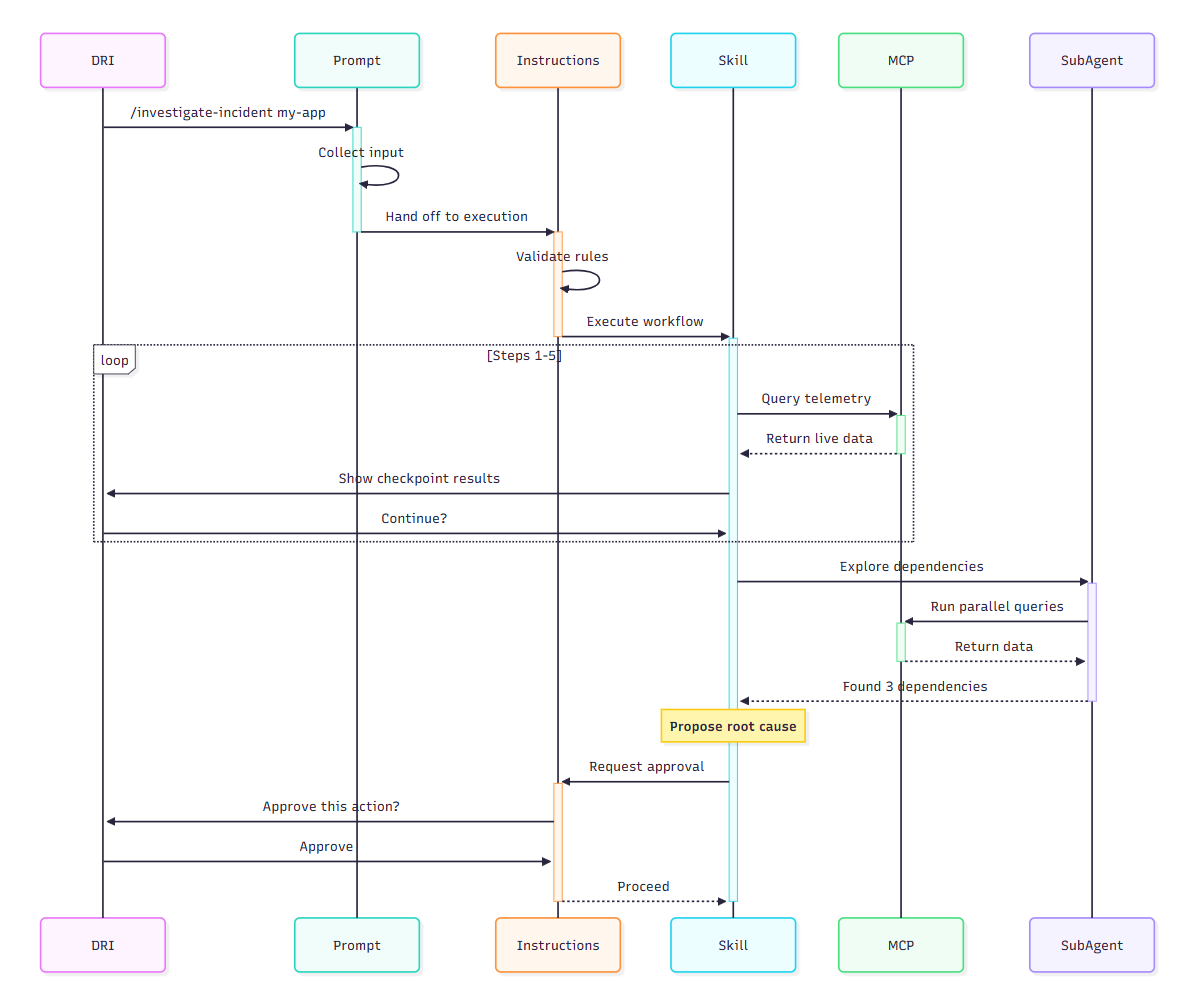
Your DRI types: /investigate-incident my-app
Here is what happens under the hood:
Prompt activates (Layer 2)
“What incident are we looking at? Give me the app name.”
Instructions kick in (Layer 1)
The agent knows the non-negotiables: No skipping steps; wait for approval
Skill starts running (Layer 4)
Calls telemetry MCP to fetch app metrics
Shows the DRI checkpoint 1 results
Waits for “continue” before moving to step 2
Skill continues (Layer 4 + Layer 3)
Repeats for steps 2–5
Each step shows results, waits for approval
After step 5, sub-agent kicks in (Layer 5)
Main Agent spawns a read-only sub-agent
Sub-agent explores dependencies in isolation
Returns: “Critical dependencies found: 3”
Skill closes out (Layer 4)
Proposes root cause with evidence
Agent asks for approval (Layer 1 enforcement)
“Create ticket? Notify team?”
Waits for the DRI to approve before acting
The DRI never has to think “What do I do next?” The system guides them. The system prevents skipping. The system keeps the signal-to-noise ratio clean.
Why All Five Matter (and What Breaks Without Them)
- No instructions? People bypass safety rules. Chaos.
- No prompts? Users never know what to ask. Frustration.
- No MCP? Conclusions are guesses. Unreliable.
- No skills? Important steps get skipped. Incomplete results.
- No sub-agents? The main thread gets cluttered. Cognitive overload.
Each one solves a real problem.
- Instructions keep you safe.
- Prompts keep you usable.
- MCP keeps you grounded in reality.
- Skills keep you disciplined.
- Sub-agents keep you scalable.
Final Takeaway
You do not pick one. You do not try to make one do everything.
You use all five as a stack:
- Start with instructions to lock in what matters.
- Add prompts to give users a clean interface.
- Connect MCP servers to ground everything in reality.
- Build skills to encode your institutional knowledge.
- Spawn sub-agents to manage complexity and scale.
Once you see them as complementary layers instead of competing options, you stop fighting the system.
That is when you build incident assistants that actually work, code reviewers your team trusts, deployment systems that never skip a step, alert managers that catch the right signal.
That is when agentic works stop being a frustration and start being a force multiplier.
Build it right. Use all five.
