
GPU clusters commonly operate at poor utilization (based on Cast AI research). Teams invest in capacity procurement, then discover that static allocation doesn’t match dynamic workload demand. The result: some GPUs are overloaded while others sit idle, and the cost gap grows with each new model deployment.
GPU availability itself is constantly changing – by GPU type, cloud region, and even by hour, as the 2025 GPU Price Report illustrates. When you finally get capacity, squeezing value from it means configuring DRA, MIG partitions, GPU time-slicing, and manual workload placement. Configuration changes often require revisiting allocation decisions across clusters.
The complexity and operational overhead grow as you deploy more models, regions, and inference endpoints. Now that GPU management has become a full-time job, automation can reduce this overhead.
This article covers three GPU sharing techniques and how automation reduces the operational overhead of managing them.
GPU Time-Slicing
GPU time-slicing allows multiple workloads to share a single GPU by rapidly switching between them. Under the hood, the NVIDIA driver uses its default compute preemption mechanism to round-robin GPU access across processes. Each workload gets a time window across the full set of Streaming Multiprocessors (SMs), and context switches occur at instruction-level or compute-preemption boundaries, depending on the GPU architecture.
Unlike in other GPU sharing techniques, there’s no hardware isolation: all workloads share the same GPU memory space, memory bandwidth, and failure domain. This means that a workload that leaks memory or triggers a GPU fault can take down every other process sharing that device.
There’s also no memory provisioning guarantee – if three pods each request a time-sliced GPU, the driver doesn’t reserve a third of VRAM for each. Any one of them can allocate until the GPU runs out, causing Out Of Memory failures across all containers.
But configuring it manually in Kubernetes is tedious:
You need to define time-slicing via the NVIDIA device plugin’s ConfigMap, specifying a sharing.timeSlicing.replicas count per GPU. For example, setting replicas: 4 on a node with 2 physical GPUs causes the device plugin to advertise 8 nvidia.com/gpu resources to the kubelet, each mapped to one of the two physical devices. The scheduler sees 8 allocatable GPUs, but there’s no enforcement of compute or memory proportionality – it’s a mechanism to allow oversubscription.
Here’s an example snippet showing what it looks like in Kubernetes:
apiVersion: v1
kind: ConfigMap
metadata:
  name: nvidia-device-plugin
  namespace: kube-system
data:
  config: |
    version: v1
    sharing:
      timeSlicing:
        # Each physical GPU advertises 4 schedulable resources.
        # On a node with 2 GPUs, the kubelet sees 8 nvidia.com/gpu slots.
        # No compute or memory isolation is enforced — all replicas
        # share the full GPU and can contend for VRAM freely.
        replicas: 4

        # Optional: fail the pod request if the GPU is already at capacity
        # rather than silently oversubscribing further.
        failRequestsGreaterThanOne: false

        # Per-resource overrides when different GPU models on the same node
        # need different replica counts (e.g., A100 vs T4).
        resources:
          - name: nvidia.com/gpu
            replicas: 4
          # Uncomment to expose MIG slices with their own time-slicing policy:
          # - name: nvidia.com/mig-1g.5gb
          #   replicas: 2
You’re then editing node labels to group nodes by their time-slicing configuration, applying taints to prevent non-sliced workloads from landing on oversubscribed nodes, and potentially maintaining multiple ConfigMap variants for different replica counts across node pools.
If some GPUs on a node should be sliced (for lightweight inference) while others should remain exclusive (for training), you need a mixed strategy in the device plugin config that maps per-GPU policies by index.
Automation adjusts time-slicing replicas based on observed utilization, applying oversubscription where workloads are bursty and reverting to exclusive allocation for latency-sensitive pods.
Multi-Instance GPU (MIG)
Multi-Instance GPU (MIG) partitions a single GPU into isolated instances, each with dedicated compute and memory. On supported hardware (A100, A30, H100), MIG divides the GPU’s Streaming Multiprocessors (SMs) and memory controllers into up to seven slices, each with its own set of compute units, L2 cache partition, and memory bandwidth.
Each instance behaves like an independent GPU with hardware-level fault isolation; a kernel panic or memory corruption in one instance cannot affect another. This makes MIG fundamentally different from time-slicing or MPS (Multi-Process Service), which share the same failure domain across workloads.
However, configuring MIG manually is painful for a few reasons:
You need to define GPU Instance (GI) and Compute Instance (CI) profiles – for example, choosing between 1g.5gb, 2g.10gb, 3g.20gb, or 7g.40gb slices on an A100-40GB. These profiles follow strict placement rules. Not every combination of slices is valid; the GPU’s internal topology constrains which profiles can coexist.
Here’s an example snippet showing what it looks like in Kubernetes:
# MIG partition config for the NVIDIA MIG Manager (gpu-operator or standalone).
# Applied via ConfigMap and consumed by the MIG manager DaemonSet to create
# GPU Instances (GI) and Compute Instances (CI) on each node.
#
# A100-40GB valid placement combos (each row sums to 7 SM slices):
#   7g.40gb                          — 1x full GPU
#   3g.20gb + 3g.20gb               — invalid (only one 3g allowed per GPU)
#   3g.20gb + 2g.10gb + 1g.5gb + 1g.5gb
#   4g.20gb + 1g.5gb + 1g.5gb + 1g.5gb
#   2g.10gb + 2g.10gb + 2g.10gb     — invalid (max two 2g per GPU)
#   2g.10gb + 1g.5gb + 1g.5gb + 1g.5gb + 1g.5gb + 1g.5gb  — invalid (exceeds placement slots)
#   1g.5gb  x7                       — 7x smallest slices
#
# The GPU has 8 memory slices and 7 SM partitions. Profiles map to fixed
# physical slots, so placement is constrained by topology, not just arithmetic.

apiVersion: v1
kind: ConfigMap
metadata:
  name: mig-parted-config
  namespace: gpu-operator
data:
  config.yaml: |
    version: v1
    mig-configs:

      # Strategy: maximize small inference slices
      all-1g.5gb:
        - devices: all
          mig-enabled: true
          mig-devices:
            "1g.5gb": 7

      # Strategy: balanced mix for inference + fine-tuning
      mixed-balanced:
        - devices: all
          mig-enabled: true
          mig-devices:
            "3g.20gb": 1    # fine-tuning or large model inference
            "2g.10gb": 1    # medium workload
            "1g.5gb": 2     # lightweight inference pods

      # Strategy: single large slice + small slices for side workloads
      large-plus-small:
        - devices: all
          mig-enabled: true
          mig-devices:
            "4g.20gb": 1    # primary workload (training / large inference)
            "1g.5gb": 3     # small inference or preprocessing

      # Strategy: full GPU, no partitioning (MIG enabled but single instance)
      full-gpu:
        - devices: all
          mig-enabled: true
          mig-devices:
            "7g.40gb": 1

      # Per-GPU targeting when a node has multiple GPUs with different roles.
      # Device indices correspond to nvidia-smi ordering.
      per-device-mixed:
        - devices: [0]
          mig-enabled: true
          mig-devices:
            "3g.20gb": 1
            "2g.10gb": 1
            "1g.5gb": 2
        - devices: [1]
          mig-enabled: true
          mig-devices:
            "1g.5gb": 7
Nodes must be drained and GPU processes terminated before toggling MIG mode, since enabling or disabling it requires a GPU reset.
You also have to define partition sizes, enable MIG mode on nodes, manage device plugin settings, and ensure workloads target the right instances.
If you change your workload mix and repartition GPUs, update configs, and restart pods. The setup is brittle: what works today breaks when a new model needs a different slice.
An automated system reconfigures MIG partitions in response to workload changes, scheduling node drains during maintenance windows, and applying validated partition profiles.
Dynamic Resource Allocation for GPUs
Note: DRA graduated to General Availability in Kubernetes 1.34. The stable API (resource.k8s.io/v1) is enabled by default, with features like prioritized device lists (beta) extending GPU scheduling flexibility further.
Hardcoding GPU counts in Pod specs forces you to make static decisions about dynamic workloads. Teams usually pick a number upfront, often overprovisioning to be safe, and that number stays locked in regardless of actual utilization. When requirements change, they’re updating manifests across deployments, environments, and teams.
Workloads that could share a GPU each claim a full device instead. Scheduling becomes rigid: Kubernetes sees requests, not real usage, so bin-packing suffers, and GPUs sit idle. What starts as a simple configuration choice becomes scattered technical debt that grows with every new model and endpoint.
Dynamic Resource Allocation changes how Kubernetes clusters request and share GPUs. Workloads specify their requirements through resource claims, and Kubernetes matches workloads to available GPU resources based on the claim. When requirements change, update the resource claim rather than modifying individual pod specs across deployments.
Instance selection becomes more precise when automation filters by GPU memory or performance, rather than by node selectors. Kubernetes gains visibility into actual resource needs, improving bin-packing and reducing idle capacity. Batch jobs can target cost-optimized GPUs, whereas latency-sensitive inference requires higher performance.
Example: GPU Provisioned Equals Requested, Yet Utilization Is Poor
In this example, a Kubernetes cluster running mixed inference and batch workloads requested GPU capacity matching its provisioned allocation. Despite the 1:1 ratio between provisioned and requested GPUs, actual utilization remained low. Most workloads held exclusive GPU access but used only a fraction of available compute.
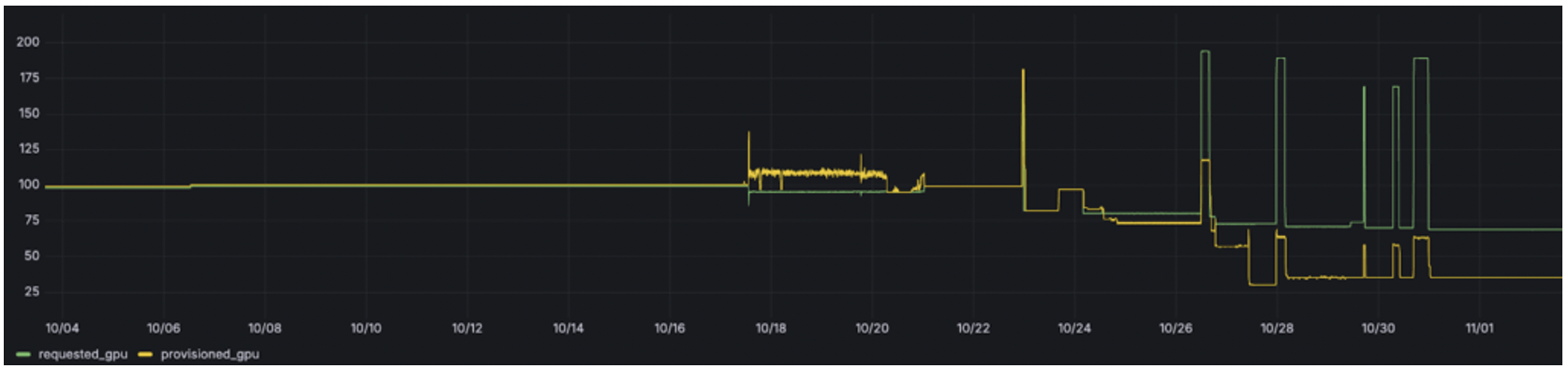
Figure 1: GPU allocation before automated sharing.
After enabling automated GPU sharing (time-slicing for batch workloads, MIG for concurrent inference), the cluster serves the same workload requests with fewer physical GPUs:
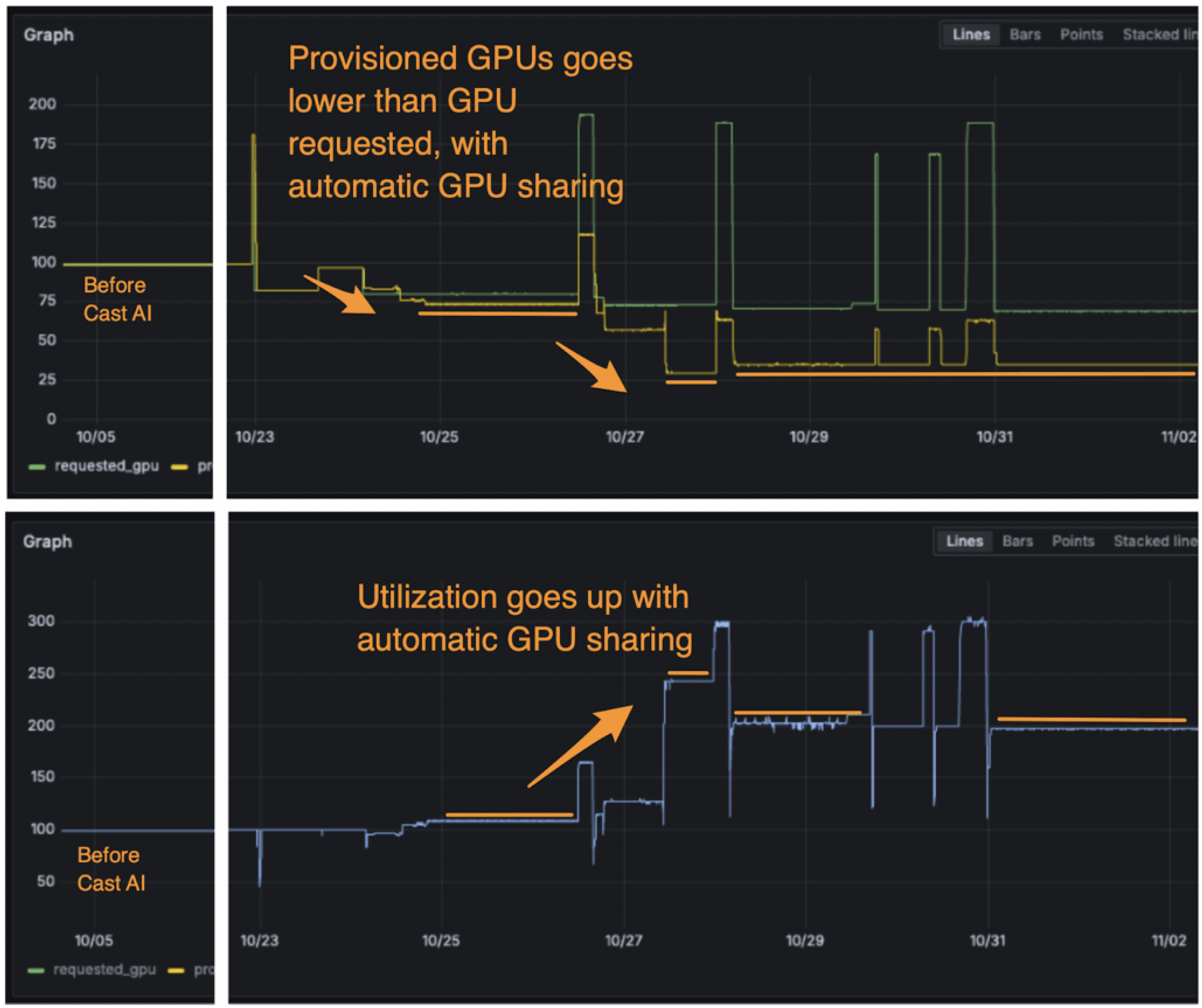
Figure 2: GPU allocation with automated sharing. Provisioned GPU count decreases while requested capacity remains the same, reflecting higher per-GPU utilization through time-slicing and MIG partitioning.
The reduction in provisioned GPUs translates to lower daily compute costs:
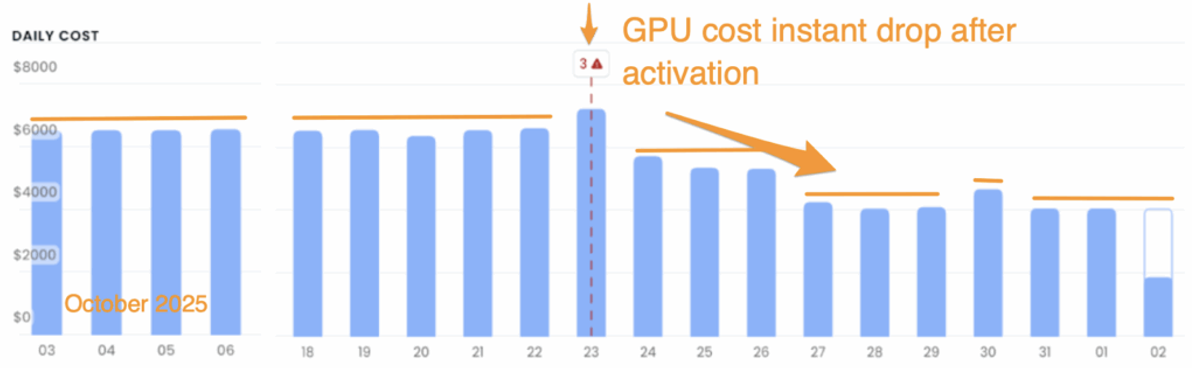
Figure 3: Daily GPU compute cost before and after automated sharing. Cost reduction corresponds to the decrease in provisioned GPUs shown in Figure 2.
Reduce GPU Management Overhead With Automation
Manual GPU configuration in Kubernetes doesn’t scale with the number of models, regions, and inference endpoints teams run today. Time-slicing, MIG, and DRA each solve part of the problem, but managing them manually creates configuration overhead that compounds over time.
Automating GPU sharing decisions – monitoring utilization, adjusting partitions, and matching workloads to appropriate GPU resources – reduces overhead. The trade-off is added system complexity and the need for observability into automated decisions. Teams should start with the lowest-risk technique for their workload mix (typically time-slicing for batch processing or MIG for multi-tenant inference) and automate incrementally.
